What is AI good at? Actually good at?
There are not many things.
We will come back to this.
What is an LLM?
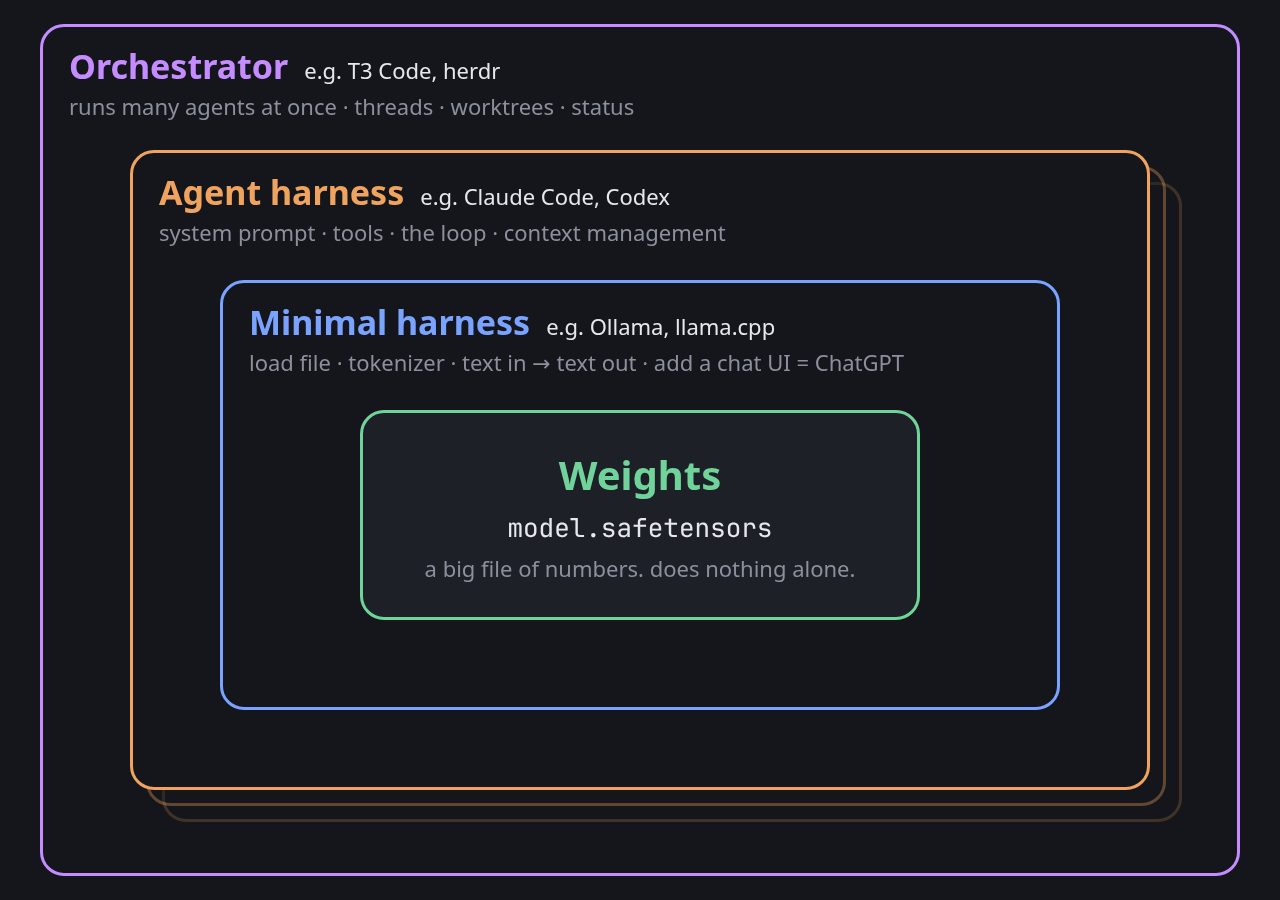
An LLM on its own is just weights. A file. It doesn’t do anything.
A minimal harness:
- Loads the file
- Sets up the encoder and decoder
- Takes text in, puts text out
The model never sees text. It only works with numbers. The encoder chops your text into chunks called tokens and swaps each one for a number. The model does its math on those numbers and picks the next one. The decoder turns that number back into text.
That’s it. It predicts the next chunk of text, over and over, until it stops.
Most frontier models can read images too. They just use a different encoder. It chops the picture into small tiles and turns each tile into numbers, the same kind the text encoder makes. The model doesn’t care where the numbers came from.
That encoding is lossy, though. Small text, exact values and fine detail get blurry. If you have the data behind a picture, give it the data instead.
Wrap that in a web UI and you have ChatGPT.
How do we get AI to do tasks?
You need a bigger harness, an agent harness. Claude Code and Codex are agent harnesses. Most of them have:
- A system prompt. Standing instructions the model sees before anything you type.
- Tools. Functions the model can ask for, like reading a file, searching the web or running a command. The model doesn’t run them. The harness does, then hands back the result.
- A loop. The model asks for a tool, the harness runs it, the result goes back in. Repeat until the model says it’s done.
- Context management. The model can only see so much at once. Something has to decide what stays in and what gets summarized or dropped.
And then you run a bunch of them
One agent works on one thing at a time. The next layer up runs a bunch of agents at once and keeps track of them. Each one gets its own thread and its own git worktree, and you can see who’s working, who’s stuck and who’s done. T3 Code and herdr do this.
Nobody’s settled on a name for it yet. “Orchestrator” is the most common. You’ll also see “meta-harness” and “ADE”, short for agentic development environment.
Each layer wraps the one inside it:
Why should everyone using AI know this?
The baseball question
A friend asked ChatGPT how far a batted ball would travel. It gave a number with total confidence. Then they looked up real hits at a similar angle, and ChatGPT was way off from those and from what MLB measured.
Why did ChatGPT miss?
In a plain chat, the model answers from memory. It’s doing the next-token thing from the top of this page, producing text that looks like a physics answer. Nothing checks it. A wrong number reads just as confident as a right one.
The better method
I gave the same question to Codex, running in T3 Code:
calculate the distance a ball travels starting at 3 feet off the ground at 104 miles per hour at an angle of 49 degrees, no wind, normal air pressure, normal humidity, at the average altitude of Milwaukee, estimate back spin, lookup baseball air resistance, crosscheck historical data on flight characteristics. make a dir for your work if needed
About 12 minutes later it had:
- Looked up Milwaukee’s elevation and worked out the air density there
- Found Alan Nathan’s published baseball trajectory model and used it to estimate backspin, about 5,000 rpm
- Written a simulation with gravity, drag and spin, then tested it against cases with known answers
- Pulled every MLB Statcast hit from 2015 to 2025 at 103 to 105 mph and 48 to 50°
| Distance | |
|---|---|
| Agent’s simulation | 305 ft |
| 197 real MLB hits, same speed and angle | 312 ft average |
| Middle 80% of those hits | 291 to 333 ft |
It also flagged its own weak spot. Spin is a guess, and spin moves the answer by tens of feet. Still, 197 real hits landed right around its number.
The agent didn’t know the answer either. It went and got the inputs, did the math in code, and checked its answer against reality before telling me.
Is this perfect? No. But we can be a lot more confident in it, and we can review the work and iterate on it.
How is it actually doing this?
The harness can call tools. A tool call is just the model outputting a special string of characters, something like this:
<tool_call>read_file("notes.md")</tool_call>The harness is a traditional computer program. It watches the model’s output for that string, runs the tool, and puts the result back into the context window.
How did we make it not suck?
Code is text. Results are usually text too.
Coding is the easy case. Code runs or it doesn’t. Tests pass or they don’t. A coding agent writes something, runs it, reads the error, fixes it, and runs it again. That’s pretty much what a software engineer does all day.
There are still plenty of ways to fail:
- Did the test make sense?
- Did the model understand the result?
- Is the code actually any good?
But programmers have been working on these problems for half a century. All that existing work shows what good tests, results and code look like. And the vast majority of that work is text.
THIS is what brought us into the current age of AI.
Once a model clears a minimum bar of capability, AI labs can train it on practice tasks. Fix a bug in a snapshot of some random repo. Build a new project from scratch.
- Runs that work nudge the weights toward whatever the model did.
- Runs that fail nudge them the other way.
- Do more of what works, less of what doesn’t, ad infinitum.
Repeat that across massive training runs and the model gets better at the actual work.
What helps?
- The harness. Can it look things up, run code and check its own work? What tools are available? That’s what all the layers above are for. This is the fun part for programmers. We get to build our agents their own tools, or hook them up to existing ones.
- The prompt. Did you ask it to? Mine told it to look up air resistance, estimate spin and crosscheck history. Without that, even an agent might just guess.
- The model. It sets the ceiling. A good harness and a good prompt can’t make a weak model smart. The worst models can’t even reliably execute tool calls.
Get all three optimized and it works much more often.
Not a perfect experiment, since the chat and the agent may not have been running the same model. But the agent didn’t win by remembering more. It won because it checked.
But my work isn’t code…
Not so fast. It probably is code already, or it could be. If it’s on a computer, it’s code in some way, shape or form. And remember, we can also work with images.
- A spreadsheet. Every formula is a tiny program, and every cell is a variable.
=SUM(B2:B14)is code whether anyone calls it that or not. - Sorting your inbox. “If it’s from my boss and mentions a deadline, it’s urgent” is an if-statement. A pile of those is a program.
- A song. Sheet music is a list of instructions. Play this note, hold it this long, repeat these four bars. Software can read it and play it back.
So… how do we make it good at anything else?
Turn it into code wherever we can. But there’s a catch.
A problem, and the ugly fix
People use computers with a keyboard, a mouse and a monitor. Lots of popular programs have no programming interface at all. There’s no tool call for “click the blue button in that one app your company bought in 2011.”
Remember that models can read images? The image can be a screenshot of your desktop. The tool calls can be the same things you do with your hands:
screenshot()
click(412, 230)
type("Q3 budget final")
press("Enter")
It’s the same agent loop from earlier. The harness takes a screenshot, the model looks at it and picks an action, the harness moves the mouse or types, then takes another screenshot. Repeat until it’s done. This is called computer use.
The Astra trailer
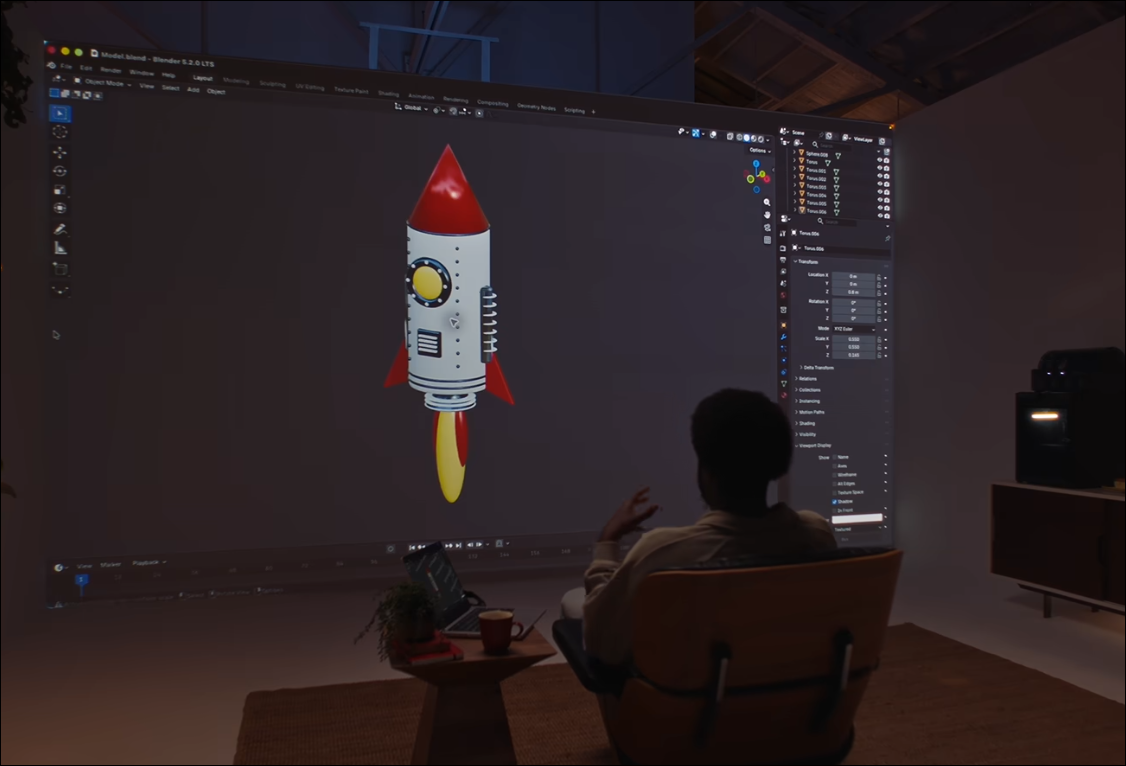
OpenAI’s GPT-6 Astra launch leaned hard on this. The pitch is a model that drives your browser and desktop apps the way a person would. Filling out forms, updating records, editing spreadsheets.
It looks like magic in a trailer. But think about it with everything from above.
- Every step goes through the lossy image encoder. Small text and exact positions are its weak spots, and clicking needs an exact position.
- The results aren’t text anymore. Did the click work? The model has to squint at another screenshot and guess. The clean pass/fail that makes coding work is gone.
- One action becomes dozens of steps. A single tool call turns into click, wait, screenshot, scroll, screenshot, click. If each step works 95% of the time, twenty steps in a row all work about a third of the time.
- Screenshots eat context. Every one costs far more than the text it shows.
Computer use is the ugly fix. It works, and it’s getting better, but it’s the last resort. If the program has a real interface, or saves a file the model can read, use that instead.
So what’s the best way to do it?
We figured out the right way first. Then we built the ugly fix. Then we told everyone to use the ugly fix, because they’re lazy.
We’re engineers. We want the best way.
Building the factory
Every layer on this page is a part you can pick, tune or build yourself.
- The model. It sets the ceiling, so pick one that’s good at the job. Bigger isn’t always better. A fast, cheap model is fine for sorting email.
- The harness. Claude Code, Codex, or your own. This is where the loop lives.
- Tools. Real interfaces, not screenshots. A small script that talks to your app’s API beats clicking through it every time.
- Guidance. Written instructions on how you want things done. Most harnesses load instruction files and “skills” automatically, so you write it once and every agent reads it.
- Tests. Rules a computer can check without asking the model. Pass or fail, no judgment calls.
Put all of that together and you have a factory. The work is what comes out of it.
Two loops
Say you set all that up. Proper harness, the best tools, context on how you want things done, even some rules that are fully verifiable.
It will still get things wrong sometimes. What you do next is the whole game.
The inner loop is a thread. You give an agent a task, it works, you review what it made. If it’s wrong, you could just fix it and move on.
The outer loop is the factory. Instead of only fixing the output, ask why the factory let it happen. Was a tool missing? Did the guidance not cover it? Is there a check that would have caught it? Fix that, and every thread after this one gets better.
You don’t have to build the factory by hand either. Agents are good at writing their own tools, tests and instructions. Work inside threads, and keep coming back to the outer loop.